


 By
- Aaliya Yousaf.
 Blog
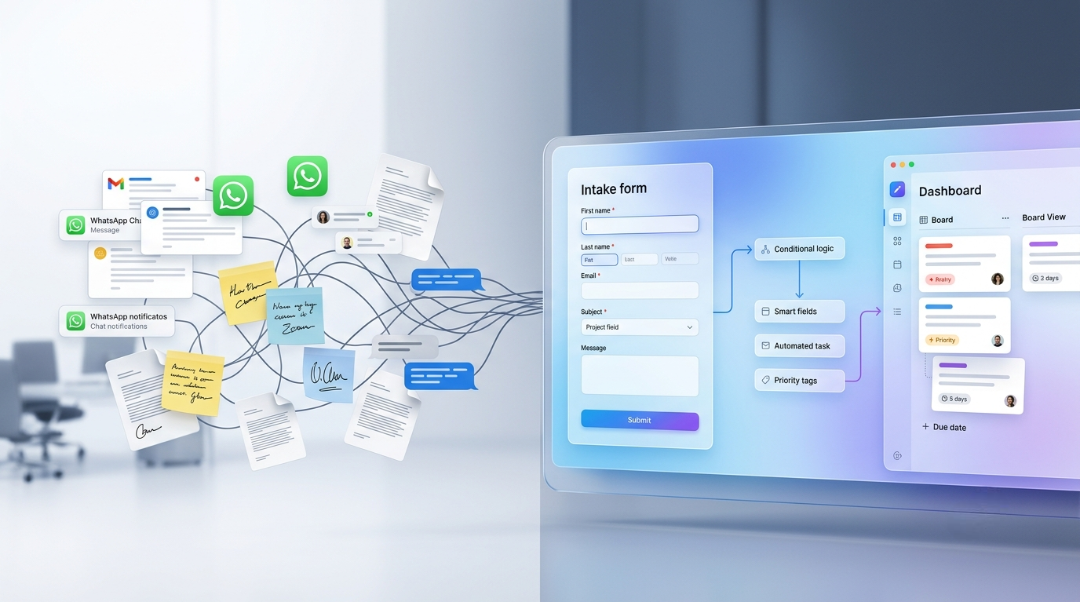
Every business has some version of the same problem: requests come in through email, WhatsApp, or a hallway conversation, and by the time they turn into an actual task, half the details are missing or someone has to chase the person down for context. Asana Forms solves this directly, and it's one of the most underused features we see across implementations — not because it's complicated, but because it usually gets skipped in favor of getting basic task management working first.
The core idea behind Asana Forms is simple: instead of a request arriving as a vague message that someone has to translate into a proper task, the requester answers a structured set of questions upfront. The form submission becomes a task automatically, already populated with the details a task actually needs — owner, category, priority, context — without anyone doing manual data entry.
A form lives inside a project and collects structured input through a set of fields — short text, dropdowns, multi-select, dates, and more. When someone submits it, Asana automatically creates a task in that project, with each answer mapped to a corresponding task field or the task description.
Most people who've only glanced at Asana Forms don't realize they support conditional logic — questions that only appear based on a previous answer. This is what turns a form from a static checklist into something closer to a smart intake system.
Example: A single "IT request" form can ask "What type of request is this?" — and depending on whether someone selects "New equipment," "Access issue," or "Software install," the following questions change entirely. A single form replaces what would otherwise need to be three or four separate ones.
This matters because it keeps the form short and relevant for the person filling it out, while still capturing the detailed, category-specific information the receiving team actually needs to act on the request.
Equipment, access, and maintenance requests routed by category, with priority level captured upfront instead of discovered after the fact.
Leave requests, letter requests, and general HR queries — covered in more depth in our HR and recruitment guide.
Campaign or design requests from other departments, with brief details captured consistently instead of arriving as a half-finished email.
Collecting new client information at the start of an engagement — a pattern we cover in our professional services guide.
A simple way for external contractors to report status without full platform access — detailed in our construction and real estate guide.
Structured issue reports that capture severity and reproduction steps consistently, rather than relying on however the reporter chooses to phrase it.
A form alone gets structured intake. A form paired with automation rules removes the manual triage step entirely. Once a form submission creates a task, rules can act on the answers immediately — assigning the task to a specific person based on the category selected, setting a due date based on the priority level chosen, or moving the task straight into the correct project section.
This is where forms stop being just a tidier inbox and start functioning as an actual intake system — requests get to the right person, correctly prioritized, without a human doing that sorting manually every time.
Forms can be shared publicly, which means clients, subcontractors, or vendors can submit requests without needing an Asana license at all. This is one of the more overlooked benefits — external parties get a simple, structured way to submit work, and it lands directly as a properly formatted task without anyone on your team needing to grant broader platform access just to receive a request.
Forms are one of the pieces most likely to get skipped in a self-managed setup, precisely because they're not essential to basic task management working. We treat them as a core part of implementation wherever a client has a recurring intake process — not an optional add-on.
We identify your team's recurring request patterns and build conditional logic around them, not a generic template.
Every form we build is paired with routing and assignment rules, so intake doesn't stop halfway.
We help set clear expectations with the team so the form actually replaces the old email or WhatsApp habit, not just adds another channel.
Asana Forms turns vague requests into structured, actionable tasks — and paired with automation, it removes the manual triage step almost entirely. It's a small piece of the overall setup, but it's one of the highest-leverage features most teams never get around to configuring properly.
If your team is still fielding requests through email or WhatsApp, book a free consultation with SassyOS and we'll show you what a proper intake system looks like.
Core Asana Services
Automation & Reporting
Industry Use Cases
Consulting & Distributed Teams
We'll build intake forms mapped to how your team actually receives requests — connected to automation, not just sitting unused.
Book a Free Consultation Get in Touch