


 By
- Aaliya Yousaf.
 Blog
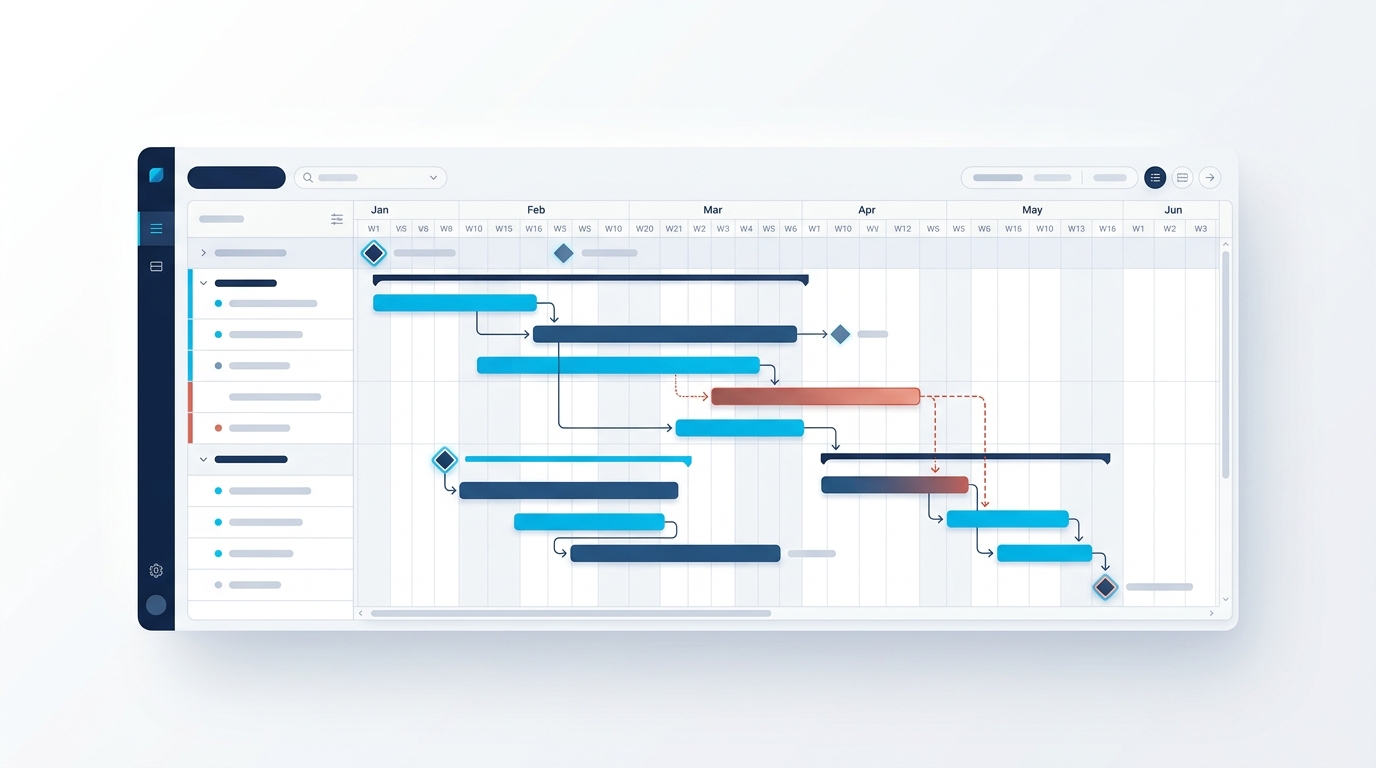
Every project management tool claims to have a Gantt chart these days, and most of them are little more than a bar chart with dates on it. Asana's Timeline view is genuinely more useful than that, but only if it's built correctly — set it up as a static list of dates and it becomes exactly as useless as a spreadsheet with colored bars. Set it up around real dependencies, and it becomes the single view that tells you, days in advance, exactly which delay is about to become everyone's problem.
The feature that separates a real Gantt chart from a decorated to-do list is dependencies — the ability to say "this task can't start until that one finishes." Without that link, moving one task's date doesn't warn you about anything downstream. With it, dragging a delayed task automatically shows every task that's now at risk. Most teams that say "we tried Timeline and it wasn't useful" skipped this step entirely.
Timeline displays a project's tasks as horizontal bars plotted against dates, similar in appearance to a classic Gantt chart. What makes it more than a static picture is that it's built on the same underlying task data as every other view — a change made in Timeline updates the task everywhere else, and vice versa, rather than existing as a separate scheduling document that needs manual reconciliation.
Dependencies are what turn Timeline from a visualization into a warning system. Once Task B is marked as dependent on Task A, moving Task A's due date later automatically flags Task B as now at risk — visually, on the timeline itself, rather than something someone has to notice manually.
A dependency should mean "cannot start until," not "would be nice to do after." Over-linking tasks that don't truly depend on each other creates false alarms that people learn to ignore.
The most valuable dependencies are often cross-phase — a design approval blocking production, for example — since those are the links teams are most likely to miss without a visual warning.
Scope changes mid-project, and dependencies should get updated alongside it — a stale dependency map is often worse than none, because it creates false confidence.
Not every delayed task threatens the project's end date — only the ones sitting on the critical path do. With dependencies mapped properly, Timeline makes this visible: follow the chain of connected tasks leading directly to the project's final milestone, and any task on that chain is critical, while tasks with slack (room to slip without affecting the end date) aren't. This distinction matters enormously for where a project manager's attention should actually go — chasing a non-critical delay wastes urgency that should be spent on the chain that actually threatens the deadline.
Milestones represent a point in time, not a duration — an approval, a launch date, a payment trigger. The mistake many teams make is treating every important task as a milestone, which dilutes the signal. Reserved for genuinely significant points — the kind referenced in our construction and real estate guide for payment-linked deadlines, or the countdown milestones covered in our events management guide — milestones stay meaningful markers rather than just another task type cluttering the timeline.
Timeline earns its place for projects with genuine sequencing — construction phases, event countdowns, product launches, anything where task order matters and delays cascade. For simpler, less sequential work — a recurring content calendar, an ongoing support queue — Board or List view is usually more practical, and forcing a timeline structure onto work that doesn't have real dependencies just adds visual complexity without adding insight.
A Timeline view is only as useful as the dependency mapping underneath it — which is exactly the part most self-managed setups skip in favor of just getting dates on a chart.
We map genuine task dependencies during implementation, so Timeline actually warns you before a delay cascades.
We reserve milestone markers for genuinely critical dates, keeping the timeline readable rather than cluttered.
We use Timeline where sequencing genuinely matters, and simpler views where it would just add clutter.
Timeline is only as good as the dependencies mapped underneath it. Skip that step, and it's a static picture of dates that stops matching reality within weeks. Set it up properly — real dependencies, deliberate milestones, buffer built in — and it becomes the view that tells you which delay actually matters, days before it becomes everyone's problem.
If your team's Timeline view has stopped being useful, book a free consultation with SassyOS and we'll show you what a properly mapped one looks like.
Core Asana Services
Industry Use Cases
Reporting & Feature Guides
We'll map real dependencies and milestones so your Timeline view tells you what's at risk before it becomes a problem.
Book a Free Consultation Get in Touch